Article
Standing desk posture tips for coding sessions

Coding at a standing desk often fails in a predictable sequence. You raise the desk once, feel productive for a short stretch, then lock your knees, lift your shoulders, and chase a failing test while your wrists hover in an awkward extension.
This guide is a practical posture and geometry playbook for developers who use sit/stand desks during long keyboard sessions. It is educational setup guidance, not medical advice. If you have pain, numbness, or an injury, consult a qualified clinician.
At a glance
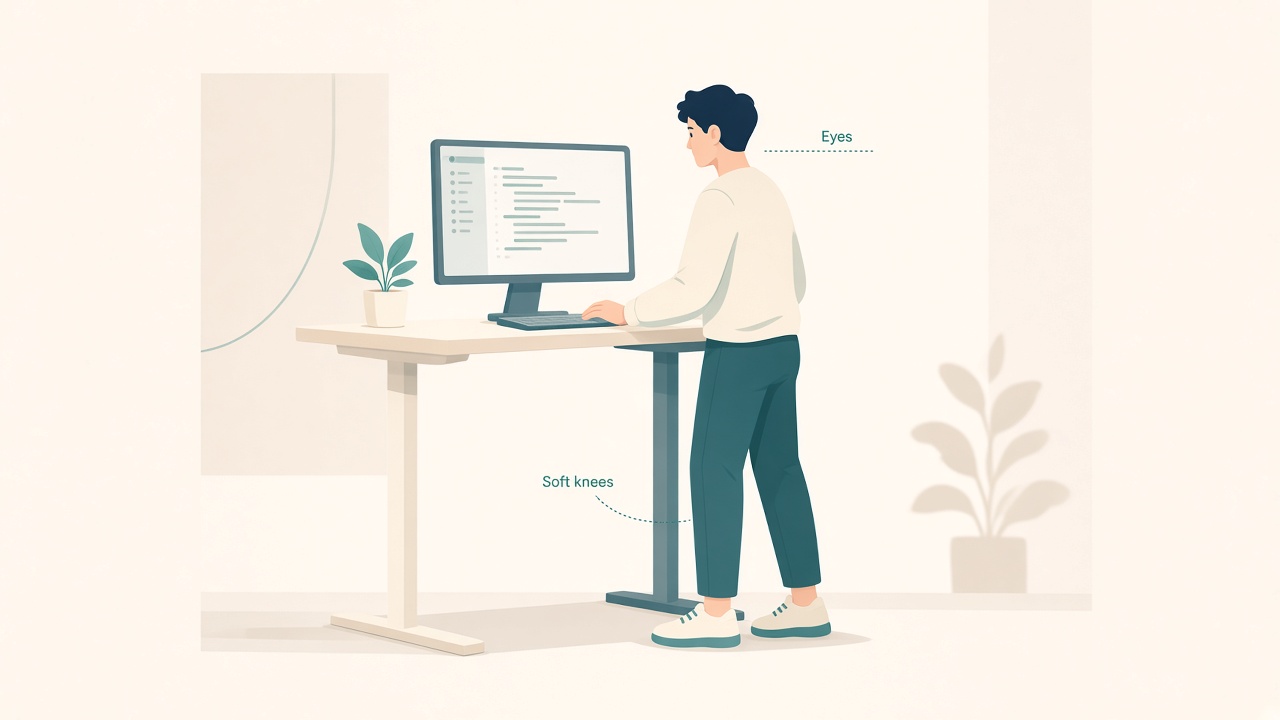
Eye-level screens and soft knees while standing.
What “good enough” looks like for coding
Coding work combines long keyboard use, frequent pointer bursts, and repeated glances between editor, terminal, browser, and documentation. That mix needs a geometry that stays usable for hours, not a pose that looks correct for a photograph.
Aim for wrists that stay near neutral while typing, shoulders that stay low rather than shrugged, and a screen height that does not force a constant chin tuck or forward crane. Standing blocks should also be time-boxed so fatigue does not invent unstable stances.
Perfect stillness is not the goal. Easy, small movement inside a sound default stance is.
Set height for typing, not for vibes
Desk height
With shoulders relaxed and elbows near your sides, set the desk so your forearms sit roughly parallel to the floor when fingertips rest on home row. If elbows flare outward or you shrug to reach the keys, the desk height is wrong for typing.
Developers often set standing height for the mouse arm and forget the keyboard plane. If a debug session is mouse-heavy, re-check both input devices at the same height before you extend the stand block.
Monitor height
Place the top of the useful screen area near eye level. On ultrawides or multi-pane layouts, prioritize the primary editor pane rather than a secondary browser chrome at the extreme top of the display.
If you wear progressive lenses, you may need the monitor slightly lower so focus stays clear without tipping your head into a fixed awkward angle. Adjust for readable focus, not for a generic height rule copied from a chart.
Laptop-only coding
A laptop flat on a standing desk is a posture trap. Use a riser with an external keyboard and pointer. Standing does not correct a low screen; it can make the forward hunch more dramatic because your feet are planted while your neck still reaches down.
Standing stance that survives a build
Use a default stance you can maintain through a compile-and-test cycle. Keep knees soft rather than locked, allow small side-to-side weight shifts, and place one foot on a low footrest or crossbar occasionally if that reduces fidgeting.
An anti-fatigue mat can help short stand blocks feel steadier on hard floors. Wear shoes you would actually walk in; socks-only on hard floors usually becomes uncomfortable faster than people expect.
Avoid the museum-guard pose: locked knees, pelvic thrust, and a phone in hand while you only pretend to work. That stance loads joints without delivering useful coding focus.
Keyboard and mouse specifics for developers
Keyboard
Keep the keyboard close so you are not reaching forward and loading the shoulders. A negative or flat tilt often feels better than a steep wrist-extension tent during long typing blocks.
If you use a split or ortholinear board, re-center it when the desk moves. Standing changes where “center” feels relative to your torso, and a board that drifted during the last sit block will invite a twisted reach.
Mouse and trackpad
Keep the pointer at the same height as the keyboard and close enough that your elbow stays near your body. For heavy browser debugging, swap mouse hands for short stretches or lean on keyboard shortcuts to cut repeated reaches.
Laptop plus external monitor
Keep the laptop as a secondary display only if its height does not force a second neck angle. Otherwise close the lid or match heights carefully so you are not alternating between two incompatible viewing planes.
Session structure beats heroic standing
A useful coding pattern is to stand for the first compile-and-orient block of twenty to forty minutes, sit for deep implementation when precision matters, stand again for reviews or CI watching, and sit for long merge-conflict work if you start fidgeting.
If standing quality collapses into shrugged shoulders, locked knees, or hunting for the mouse, sit down. Poor standing form is a worse bargain than a well-set seated block.
Use a timer. Developers often ignore body cues when a stack trace is interesting, and a timer restores the sit/stand decision before fatigue invents a worse stance.
Debug-mode traps
Bug hunts create posture debt quickly. Common patterns include leaning into the screen to read tiny logs, perching on one leg, craning toward a second monitor with mismatched height, and holding a cup in the non-mouse hand for long stretches of asymmetric load.
Mitigate those traps before the incident escalates. Increase font size for log panes during intense debugging, align monitor heights before the incident rather than during it, put the cup down between sips, and take a thirty-second reset after you push a fix: shoulders down, eyes across the room, hands shaken out.
Cable motion and editor hygiene
Sit/stand coding setups fail when the desk rises and yanks a dongle. Route cables with slack for full travel so a rising desk cannot disconnect the keyboard mid-thought.
Geometry also helps more when the interface is readable. Increase editor zoom during standing blocks if you notice yourself drifting forward, hide rarely used panels, and place the terminal where you can glance without a full torso twist. Standing is not a substitute for tiny fonts and a chaotic IDE layout; it often exposes those problems faster.
First week of standing while coding
Do not jump to long standing marathons. For five workdays, stand about twenty minutes at the start of a coding block on days one and two, add a second twenty-minute stand after lunch for reviews or docs on days three and four, and try a thirty-five to forty minute stand on day five only if stance quality stayed high.
Write down what broke: numb feet, shrugged shoulders, or cable snags. Fix that constraint before you extend standing time. Progressive exposure beats a heroic Monday and an avoided desk on Tuesday.
Checklist
- Standing elbow height matches home-row typing
- Primary editor sits at a comfortable eye level
- External keyboard and pointer are used if the laptop is raised
- Soft knees and deliberate weight shifting are allowed
- Mouse stays within near-elbow reach
- Font sizes remain readable without hovering into the glass
- Sit/stand rotation is timed rather than all-day heroic standing
- Cable slack is verified through full desk travel
- A quick reset habit follows intense debug bursts
FAQ
Should I stand for an entire coding day?
Usually no. Rotate sit and stand blocks. All-day standing often creates new fatigue patterns. Short quality blocks beat long sloppy ones.
Is a treadmill desk good for coding?
For reading or light review, it can work for some people. For precise typing and dense debugging, many developers prefer a still standing or sitting surface. Test before you commit to a purchase.
My wrists hurt when standing. What should I check first?
Check desk height and keyboard tilt first. Lower the desk slightly and reduce wrist extension. Persistent pain needs a clinician, not more blog tweaks.
Do mechanical keyboards change standing height?
They can, if key height or wrist rests change your forearm angle. Re-check elbow height after any keyboard swap.
What about split screens across two monitors while standing?
That layout is fine if both monitors are height-aligned and close enough that you are not rotating through a wide arc all day. Far-peripheral monitors become neck work.
Next reading
- Standing desk schedule for beginners
- Set desk height without guessing
- Anti-fatigue mat standing desk
Stand to vary load, not to prove endurance. Your best code usually comes from a body that is not negotiating a truce with the desk.