Article
Standing desk schedule for beginners
Buying a standing desk is the easy part. The hard part is building a sit/stand rotation you can keep without swollen feet, a sore lower back, or a desk that stays locked in one position after week one.
This guide gives beginners a gentle two-week schedule, task pairings, and clear sit-more signals. It is educational setup guidance, not medical advice. Sharp pain, numbness, or dizziness means sit down and seek personalized care from a qualified clinician.
At a glance
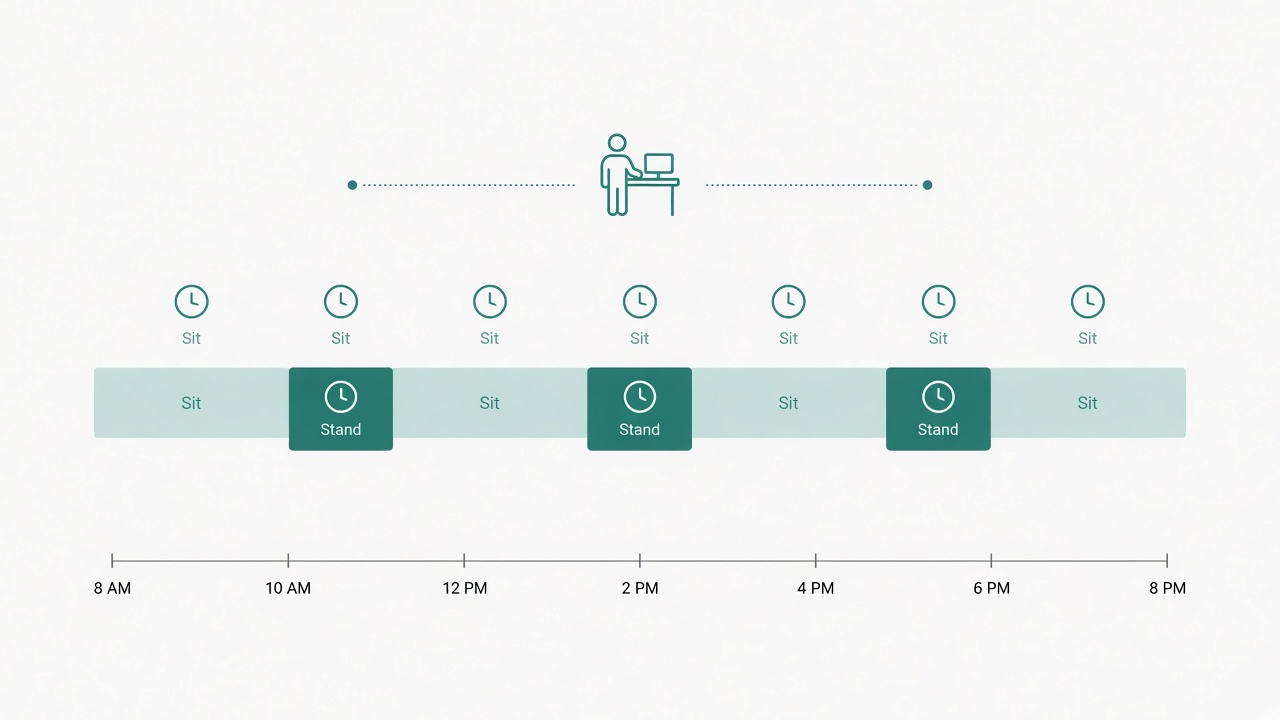
Alternate sit and stand in short, repeatable blocks.
What a beginner schedule is for
A beginner schedule exists to teach three skills at once. You learn how long you can stand with stable form, which tasks tolerate standing, and how to swap heights without breaking focus.
The schedule is not a contest for upright minutes. Short, high-quality stand blocks beat long blocks that collapse into locked knees and shrugged shoulders.
If you are brand new, also read the first-week plan after buying a standing desk for a tighter day-by-day ramp. This article covers the broader two-week pattern and how to adjust when afternoons get heavy.
Prerequisites before you trust the timer
Confirm standing typing height before you expand volume. Shoulders stay relaxed, elbows stay near your sides, and forearms sit roughly parallel to the floor at the keyboard. Place the primary screen so the useful top area sits near eye level.
Wear supportive shoes or use an anti-fatigue mat on hard floors. Keep the chair path clear so sitting remains frictionless. Verify cable slack through the desk’s full travel so a rising surface cannot yank a keyboard or laptop dongle.
Without those basics, a schedule only teaches you to associate standing with annoyance.
Week 1 template
Work in forty-five minutes sitting and fifteen minutes standing blocks as your default skeleton. Cap total standing near ninety to one hundred twenty minutes on day one if you are new, even if the first block feels easy.
Use standing for calls, inbox triage, quick reviews, and light reading. Keep deep writing, precise design, and dense debugging seated until stance quality stays stable across several days.
Generate a full-day outline with the standing desk schedule builder if you want clock times instead of improvisation. Treat the generated plan as a ceiling you can lower, not a quota you must hit.
At the end of each day, note whether form stayed clean through the final stand. If the last block was your worst block, your total volume is already too high for that day.
Week 2 adjustments
Week two is for refinement, not doubling. If mornings feel fine and afternoons feel heavy, shorten afternoon stand blocks instead of abandoning standing entirely. Many people do better with more frequent, shorter stands than with one long afternoon marathon.
You can add a few minutes to morning stands when overnight recovery remains easy. Keep one variable dominant: either block length or block count. Changing both at once makes troubleshooting impossible.
If week one left you avoiding the desk, reset to shorter day-one caps and rebuild. Avoidance is feedback about last week’s dose, not proof that sit/stand desks cannot work for you.
Stop-and-sit signals
Sit down and reset if you notice numbness, sharp joint pain, dizziness, or pressure that keeps rising after you change shoes or mat. Mild muscle fatigue can be a normal adaptation signal. Sharp pain is not a badge of progress.
Also sit when form collapses even if you are not in pain yet. Locked knees, a tucked pelvis, hovering wrists, or a constant lean into the monitor all mean the stand block has outlasted useful posture.
A useful personal rule is to sit while you still have about ten percent comfort margin left. Waiting for the last moment teaches your body that standing ends only when something hurts.
Tasks that fit standing
Standing works well for communication and shallow processing. Standups, client calls with a stable headset, email triage, ticket grooming, and documentation skims all tolerate small weight shifts.
Deep writing and precise design often stay easier seated because those tasks reward stillness and fine motor control. Debugging can go either way; many developers stand for orient-and-reproduce work, then sit for careful fixes.
Switch by task demands, not by ideology. A schedule that forces standing through a merge conflict usually produces worse posture and worse work.
Building the schedule into a real calendar
Anchor immovable meetings first, then place stand blocks in the gaps where tasks already fit standing. Mark stand blocks with the task type in the calendar title, such as “Stand: triage,” so the block has a job.
Protect at least one seated deep-work block on meeting-heavy days. Beginners often fill every gap with standing and then wonder why afternoon focus collapses. Seated recovery is part of the system.
If coworkers can see your calendar, treat stand and sit blocks as busy time with a one-line purpose. Predictable availability reduces interrupt pressure during both modes.
Footwear, mat, and environment notes
Supportive shoes plus a moderate mat are a reliable beginner pairing on hard floors. Carpeted rooms may need little or no mat because the floor already softens impact. If a thick mat makes you feel unstable, choose a firmer surface and shorter blocks.
Keep water nearby so you do not lock into a museum-guard pose while ignoring thirst. Take three steps during compiles, uploads, or meeting transitions. Tiny movement is part of sustainable standing, not a distraction from it.
Recheck desk height after you add or remove a mat. Effective elbow height changes when the floor stack changes.
Two-week checkpoint
At the end of week two, review three outcomes. First, can you complete planned stand blocks without dreading them? Second, do overnight recovery and next-morning readiness stay acceptable on most days? Third, are deep-work tasks still getting protected seated time?
If all three answers are yes, progress into slightly longer or slightly more frequent stands next month. If any answer is no, reduce volume and repair the weakest constraint: height, footwear, task pairing, or calendar friction.
Checklist
- Standing typing height and screen height confirmed
- Shoes or mat chosen for your floor type
- Week 1 default set near 45 sit / 15 stand
- Day-one standing capped near 90–120 minutes if new
- Standing paired with calls, triage, and light review first
- Deep precision work kept seated until form is stable
- Week 2 afternoon blocks shortened if energy drops
- Stop-and-sit signals defined before discomfort peaks
- Calendar titles name the standing task, not only “focus”
- Two-week checkpoint completed before increasing volume
FAQ
Is 45/15 the only correct beginner ratio?
No. It is a gentle default. Some people prefer 30/10 cycles. The useful test is stable form through the stand portion, not compliance with one ratio.
What if I can only stand a few minutes at first?
That is still a valid start. Use five to ten minute stands, protect cable and height setup, and progress only when recovery stays easy. Short successful swaps beat abandoned long blocks.
Should beginners stand during every meeting?
Only when audio, camera framing, and note-taking stay solid. If standing hurts call quality or makes you fidget on camera, sit for that meeting and stand during async triage instead.
How do I know I am ready for longer stands?
Overnight recovery is easy, form stays clean through current blocks, and you are not avoiding the desk. Increase one variable at a time after that point.
Can I use a treadmill desk as a beginner?
Treat walking desks as an advanced experiment. Master still standing and sitting rotations first. Many beginners get better results from a stable sit/stand surface before adding locomotion.
A beginner schedule works when it stays boring enough to repeat. Favor short quality stands, clear sit signals, and slow weekly adjustments over heroic upright totals.
Related tools: standing desk schedule