Article
Desk lighting without monitor glare

Glare is usually a placement problem: a bright source reflecting in the dark mirror of your monitor. Desk lighting fails when the lamp lights your face or the screen instead of the work surface. A useful setup makes paperwork and keyboard legends readable while leaving the display as an image, not a washed-out mirror.
This guide covers practical placement, brightness matching, window strategy, and a budget shopping path for home desks. It is educational workstation hygiene, not medical advice about vision.
At a glance
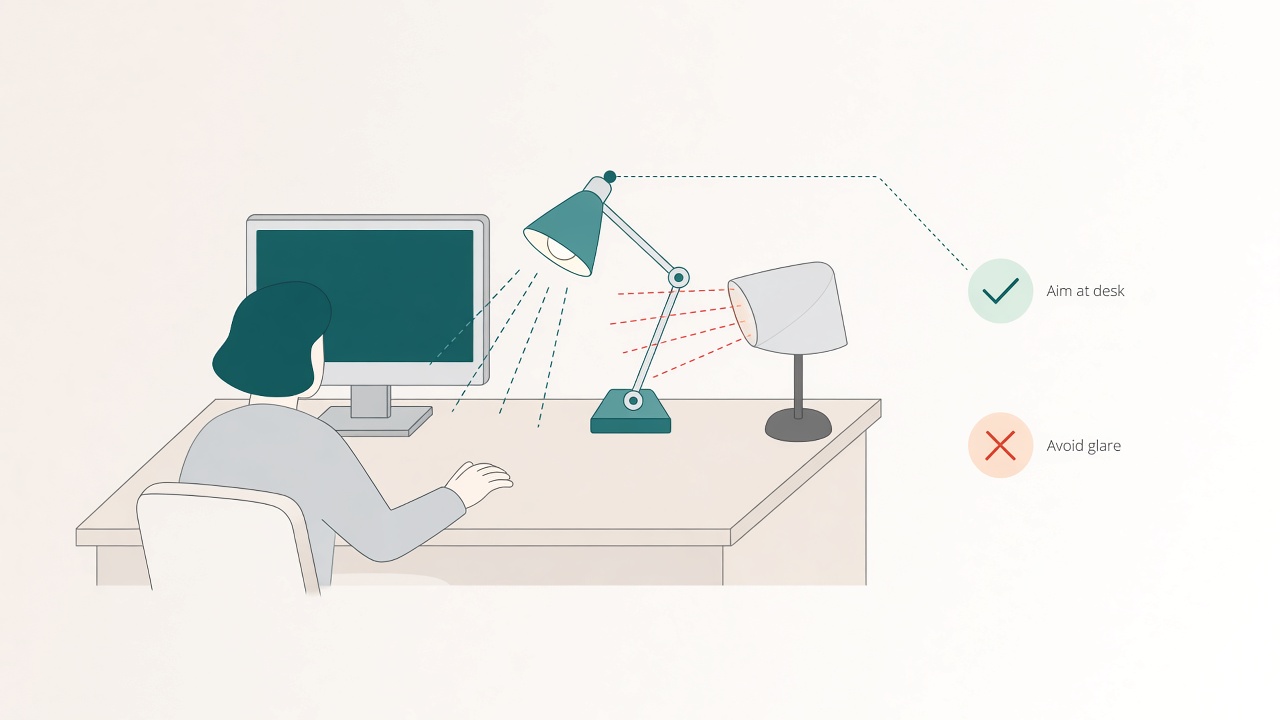
Aim the lamp at the desk surface—not the screen.
Why glare shows up at desks
Monitors behave like dark glass when a bright lamp, overhead fixture, or window sits in the wrong place. Your eyes then fight two jobs at once: reading the interface and ignoring a bright reflection. The result feels like “eye strain,” but the first fix is geometry, not a new accessory.
Treat glare as a lighting layout problem. Move the source, change the aim, or soften the window before you buy films, filters, or another panel.
Place light beside you, not behind you facing the screen
Put the lamp on the opposite side of your writing hand if you take notes, or on either side for keyboard-only work. Aim the beam at the desk surface, not into the display. Avoid a bare bulb directly above and slightly in front of the monitor, because that angle often paints a bright strip across the glass.
On dual-monitor desks, park the lamp outside the outermost bezel and aim inward at the desk surface; do not wedge a bright head between screens where it reflects into both. On sit/stand desks, prefer a clamp on the moving surface or a lamp that travels with the desk, then recheck glare when you stand—floor lamps aimed at a raised desktop often create new reflection angles.
After you move lights, re-check viewing comfort with distances from the monitor distance calculator. Lighting and distance interact: a screen that is too close makes reflections harder to ignore.
Match brightness to the room
A pitch-dark room with a bright screen forces your eyes to adapt to a glowing rectangle. Raise ambient light a little, then keep the monitor from being the brightest object in view. At night, warmer task light is often easier on comfort than icy blue flood lighting.
Use a short matching drill. Open a mostly white document and a mostly dark interface side by side. Dim or brighten the monitor until the white page does not glow like a lamp and the dark interface still has readable contrast. Light the desk surface softly without creating a lamp reflection on the glass. Recheck after lunch when daylight changes.
If you work across day and evening, keep two presets: a brighter daytime profile and a calmer evening profile. Automatic night modes can help, but they do not replace placement and glare control. For viewing resets and distance habits beyond lighting, see eye-care habits for a full screen day.
The five-minute bounce and glare test
After placing the lamp, open a light-colored document on screen and a paper page on the desk. Sit in your normal posture. Look for bright patches on the monitor. If you see the lamp’s reflection, tilt the head down, move it sideways, or raise the shade edge. Check whether your writing hand throws a hard shadow on the page, and swap sides if needed. Dim or brighten until paper is easy and the screen is not competing like a flashlight.
Do this test at the time of day you actually work late, not only at noon.
Window strategy that beats squinting
Orient the desk so the window sits to the side rather than directly in front of or behind the monitor. Facing a bright window creates harsh contrast. Putting the window behind the monitor often lights your face for calls while reflecting in the screen for you.
Sheer curtains usually help more than squinting through contrast. On west-facing desks, close or filter harsh afternoon sun before the final deep block. Small moves of the desk by even a few inches can remove a reflection strip that no software theme will fix.
Task lamp versus overhead light
Overhead fixtures flood the room and often create ceiling reflections in glossy panels. A directional task lamp gives you control: light the keyboard, notebook, and paper without blasting the display. Choose a lamp with an opaque or well-shielded shade so the bulb itself is not in your peripheral vision.
If the room still feels cave-like, add soft ambient light behind or beside the desk rather than a second spotlight aimed at the screen. Ambient fill reduces the contrast gap between room and monitor. Spotlighting your face while the room stays dark recreates the same mismatch.
Choose a simple budget lamp before optimizing bulbs
You do not need a photography kit. Budget winners usually share a few traits: an adjustable head or arm, a stable base or clamp that fits your desk thickness, a shade that hides the bulb from direct view, and enough reach to light the desk surface—not only the corner behind the monitor.
Skip tiny novelty lamps that look appealing and light nothing. A basic swing-arm or clamp lamp outperforms most ambient-only decorative lights. If you can choose bulb temperature, start near neutral-to-warm for evening desk work, then trust your eyes after placement.
A budget shopping order that avoids waste
Buy one adjustable task lamp with a real shade first. Add one soft fill source for the room if evenings feel cavernous—a floor lamp in the corner or a shaded bulb farther away. Replace bulbs only after placement is correct. Set monitor brightness presets for day versus night. Do not buy entertainment lighting kits first; color effects rarely fix unreadability.
Bias lights behind the monitor can reduce perceived contrast, but they do not illuminate paperwork well. Keep a true task lamp for notes and keyboard work.
Renter-friendly mounting tips
Clamp lamps avoid drilling. Desk pads under heavy bases protect surfaces. Simple cord clips prevent sit/stand motion from yanking the lamp. Avoid balancing lamps on unstable stacks of books near drink zones. Stability is part of lighting quality; a bumped lamp that blinds you mid-call is a workflow bug.
Paperwork, keyboards, and camera days
Paperwork needs enough light to read without leaning in. Keyboard legends need enough light to find modifiers without turning on a phone flashlight. Neither need requires washing the monitor.
On camera days, separate call lighting from task lighting when you can. A soft light near camera height helps faces. A lower desk lamp aimed at paper helps reading. Using one harsh lamp for both jobs often creates glare for you and shadows for everyone else. For face lighting specifically, see simple camera lighting for daily calls.
Common placement mistakes
Putting the lamp behind the monitor and aiming it toward your face lights you while reflecting in the glass. Parking a bright uncovered bulb above the front edge of the desk creates a mirrored stripe. Matching a dark room with maximum panel brightness makes every reflection more vivid. Stacking decorative LED strips that face the screen adds color noise without helping paperwork. An ultra-bright LED at full power inches from the notebook creates harsh pools and hard shadows.
Fix one mistake at a time and work for fifteen minutes. If a bright strip remains, move the lamp a few inches or change the shade angle before buying anything.
A practical setup sequence
Start with daylight management: curtains, blinds, and desk orientation. Add or reposition one task lamp aimed at the desk surface. Run the glare test with a light webpage open. Match monitor brightness to the room with the white-page drill. Confirm keyboard and paper readability without leaning. Recheck for lamp or window reflections on the glass. Save daytime and evening presets if your schedule spans both.
This sequence keeps spending low. Many glare problems disappear after placement alone.
When accessories help—and when they do not
Matte screen finishes and quality anti-glare coatings can reduce mirror-like reflections. They do not fix a lamp aimed into the panel or a bright window behind the display. Bias lighting behind the monitor can soften the contrast edge in a dark room, but it is a comfort layer after geometry, not a substitute for it.
Skip shopping until the free moves are done. Placement, curtains, and brightness matching remain the highest-leverage steps.
Checklist
- Adjustable task lamp chosen over purely decorative light
- Lamp placed beside the desk, beam aimed at the work surface
- Lamp opposite the dominant writing hand when you take notes
- No sharp lamp or window reflection visible on the screen
- Keyboard legends readable without leaning in
- Soft room fill added if evenings feel cavernous
- Ambient room light raised enough that the panel is not a lone glowing rectangle
- Desk oriented with windows to the side when possible
- Sheer curtains or blinds used for harsh sun
- Sit/stand positions rechecked for new reflections
- Cord strain managed on moving desks
- Day and evening brightness presets available if you work after dark
- Monitor distance rechecked after lighting changes
FAQ
Should the lamp match my writing hand side?
If you take handwritten notes, place the lamp on the opposite side so your hand does not cast a shadow on the page. For keyboard-only work, either side is fine if the beam misses the screen.
Is warmer light always better at night?
Warmer task light is often more comfortable in the evening, but preference varies. Match brightness and readability first, then adjust color temperature for comfort. For a day-to-night kelvin ladder, see color temperature from day to night.
Can I use only overhead lights?
You can, but directional task light is usually easier to aim away from the monitor. If overhead is all you have, dim it slightly and avoid sitting directly under a bare bulb in front of the glass.
Do anti-glare screen protectors solve this?
They can reduce mirror reflections. They will not fix bad lamp aim or a bright window reflection. Try placement first.
How cheap is too cheap for a lamp?
If the joint cannot hold an aim, the shade exposes the bulb to your eyes, or the clamp slips, the lamp will train you to work in the dark again. Spend enough for stable aim.
Where should a lamp go on a corner desk?
Place it on the outside edge of the primary work surface so it can aim across the keyboard without sitting between you and the primary monitor.
Next reading
- Color temperature from day to night
- Night-shift remote work lighting plan
- Eye-care habits for a full screen day
Light the work, not the glass. When the lamp serves paper and keys while the monitor stays an image, glare stops being the main character of the afternoon.
Related tools: monitor distance