Article
Night-shift remote work lighting plan
Working through the night in a dark room with only a bright screen is a classic way to feel wired and washed out at the same time. The pupils confront a glowing rectangle in a cave; the body receives mixed signals about rest; by the end of the shift everything feels harsher than the work requires. A night-shift lighting plan is not about recreating noon. It is about controlled contrast, warmer task light, and a brightness ladder you adjust on purpose.
This article is educational workstation guidance—not medical or sleep-disorder advice. If night work is harming your health or safety, seek professional support and follow your employer’s fatigue policies.
At a glance
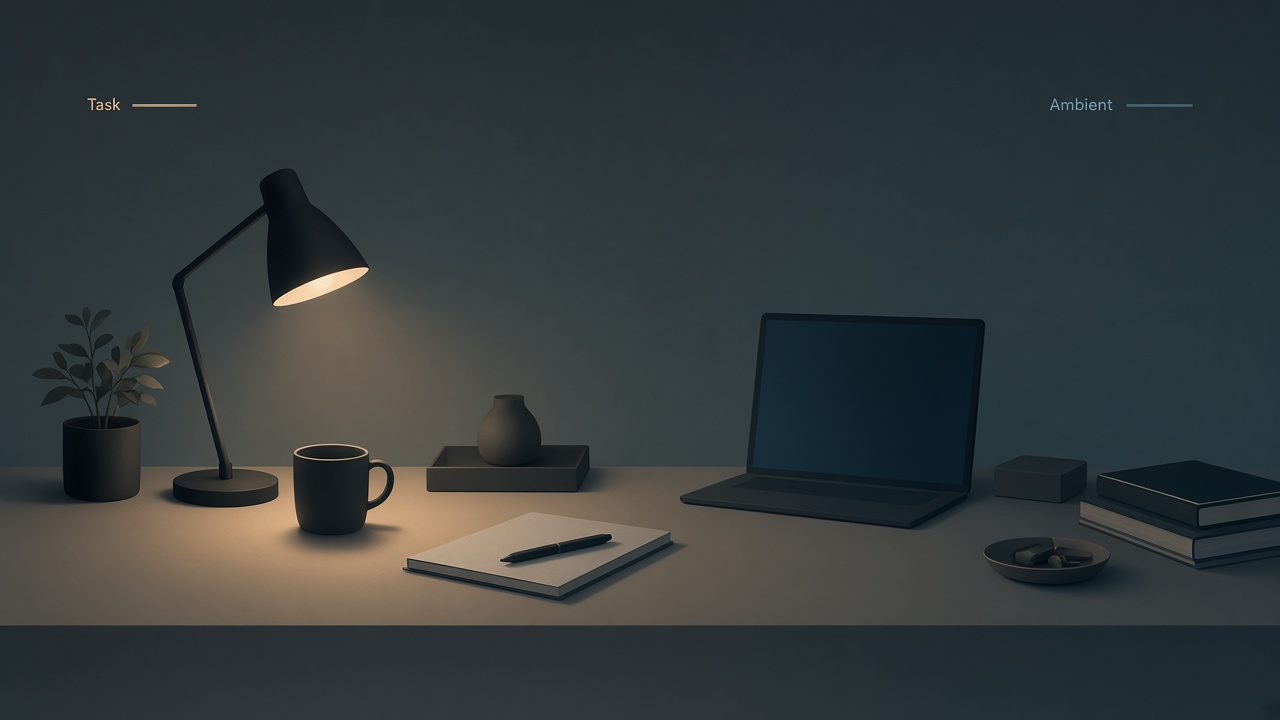
Warm task light plus soft ambient—skip harsh overhead.
Why screen-only darkness feels so demanding
High contrast makes sustained visual work harder. Dark walls plus a bright monitor often lead to squinting, leaning, and restless brightness fiddling. Full-blast overhead LEDs fix contrast by creating a new problem: glare, harsh shadows, and a clinic-like mood that does not help quiet focus.
Night work needs three layers. Soft ambient fill keeps the room from becoming a void. Task light covers keyboard, notebook, and paper. Screen brightness matches the room instead of dominating it. Miss any layer and people compensate with awkward posture or endless theme switching.
Build ambient fill without lighting the neighborhood
Use a floor lamp or a lamp bounced off a wall or ceiling corner to create gentle fill. Shade matters: exposed bulbs in peripheral vision become glittery distractions. Place ambient lighting beside or behind your main gaze, not shining into your eyes.
Prefer warmer color temperatures late at night if you are winding toward sleep after the shift. Keep intensity low to moderate; you should see the room edges clearly without a retail-floor feeling. Close curtains so outdoor glass does not become a black mirror of your screen.
If you live with others, aim lamps downward and use doors or curtains so your working “day” does not become their 2 a.m. sunrise.
Task light for hands and paper
A directional desk lamp aimed at the desk surface—not at the monitor—lets you keep ambient light modest while still seeing keys and notes. Place it usually on the opposite side of your writing hand to reduce shadows. Keep the shade below eye height so the lens is protected from direct view. Aim for brightness that serves paper without washing out the display.
If you work only digitally, you still benefit from a little desk glow so the keyboard is not a black slab under a floating screen. Task light is for the hands; ambient fill is for the room; the screen should not have to do both jobs.
The screen brightness ladder
Set brightness as a sequence, not a single forever setting. At the start of the shift, run ambient and task light with a medium screen matched to the room. Mid-shift, nudge the screen down if the room feels dimmer after your eyes adapt. In the final 60–90 minutes before sleep, dim lamps slightly and lower the screen again; enable a warm display mode if you use one. For rare color-critical tasks, raise room and screen together temporarily, then return to a matched pair.
Matching beats minimalism. A very dim screen in a brighter room causes strain the other way. Check viewing distance too—leaning into a dark room is common—and keep a sane distance with help from the monitor distance tool if you drift forward.
Color temperature across the shift
Cooler light can feel more alerting for some people at the start of a night shift; warmer light often feels calmer later. You can use that difference deliberately without obsessing over exact kelvin numbers. Early shift may use neutral light for complex work. Later shift may use warmer lamps and a warmer screen tint.
Avoid rainbow RGB glow in the peripheral field if it pulls attention from the task. Consistency matters more than theatrical precision. Sudden ice-blue overheads at 4 a.m. for a snack break can feel jarring; keep kitchen light milder when possible.
Break lighting and movement
Night shifts compress time perception, so build lighting into breaks. Stand and walk briefly to a different light zone. Avoid scrolling a phone at maximum brightness in a dark bathroom; that creates a second cave screen. If you go outside, give your eyes a minute to adjust on return before raising monitor brightness.
Keep water and simple snacks in a place that does not require blasting every light in the home. Small logistics reduce large lighting swings.
A ready-room preset you can save
Create a physical preset you can recreate when tired. Smart plugs help; labeled switches help more than nested app menus. Close curtains. Set the ambient lamp low. Turn the desk task lamp on. Leave overhead fixtures off. Match monitor brightness to the room. Optionally enable warm screen mode.
Take a photo of the setup on a good night. When you are depleted, recreate the photo instead of inventing a new lighting theory at 3 a.m.
Checklist
- Room has soft ambient fill—not screen-only darkness
- Task lamp lights the desk surface without hitting eyes or washing the display
- Screen brightness matched to the room and revisited mid-shift
- Warmth increases toward the end if sleep follows
- Curtains closed to reduce black-mirror windows
- Household light spill considered
- Phone not used as a blinding secondary screen in dark spaces
- Preset documented for tired nights
FAQ
Should I use dark mode at night?
Dark mode helps some people when the room is dim, especially in tools with large white backgrounds. It is not a complete solution. Matching overall brightness and reducing glare usually matters more than theme preference alone.
Is blue-light filtering enough by itself?
Filtering without fixing cave contrast and posture is incomplete. Use warm tints as one layer inside a fuller plan. Do not treat any filter as guaranteed sleep protection—this is not medical advice.
What about OLED burn-in and static night HUDs?
Keep static bright panels from lingering indefinitely; use screen savers or sleep timers during long breaks. A lighting plan should include turning the display down or off when you leave the desk.
Can bright light fix night-shift sleepiness?
Light can feel stimulating, but fatigue has limits. Relying on harsh brightness to overwrite sleep debt can backfire. Prefer moderate matched light, scheduled breaks, and safe work practices over glare as a stimulant.
How is night-shift lighting different from evening hobby computing?
Duration and stakes differ. A short evening browse tolerates imperfect light. A multi-hour work shift needs stable matched layers so small strains do not compound across the night.
Related tools: monitor distance