Article
Remote setup for a travel-heavy work week
A travel-heavy work week breaks home-desk habits fast. Soft hotel chairs, dead outlets behind nightstands, cafe tables that force a hunch, and Wi-Fi that stalls mid-demo all conspire against deep work. You cannot recreate a full office in a suitcase. You can pack a minimum reliable setup that protects posture, power, and call quality.
This is a practical travel kit and routine guide. It is not medical advice and not airline policy advice. Follow your carrier rules for batteries and devices.
At a glance
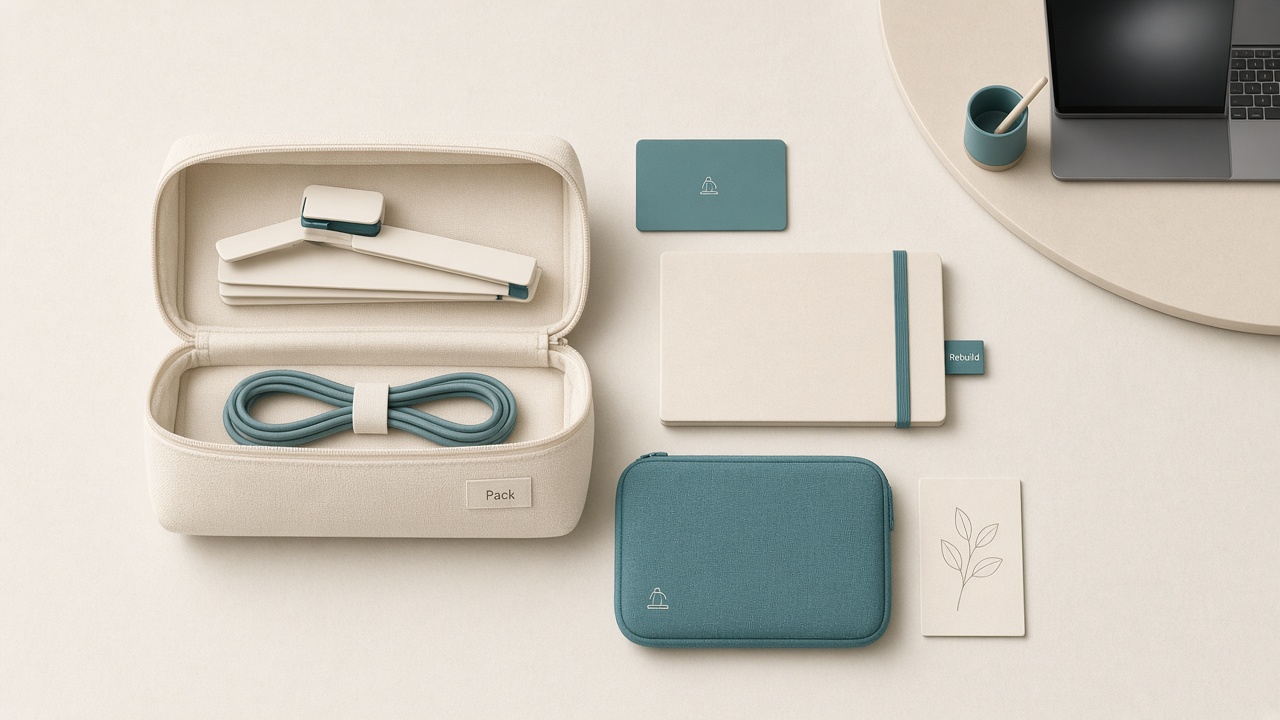
Pack light; rebuild a usable desk anywhere.
Define good enough before you pack
Travel setups fail when the standard is “identical to home.” Redefine success before the suitcase closes. You need a screen high enough that you are not folding for hours, a keyboard and pointing device that keep shoulders quieter, power that survives meetings and delays, audio clear enough that people stop asking you to repeat yourself, and a two-minute rebuild ritual in each new location.
Everything else is optional polish.
The core travel tech kit
Pack these in one pouch you never unpack into suitcase chaos: laptop and correct charger, compact laptop stand or firm fold-flat riser, slim external keyboard, travel mouse with spare battery or charge cable, short HDMI or USB-C video adapter, multiport hub if your laptop is port-light, a headset you trust, cable ties, and one extension cord or compact power strip where destination rules allow.
Add a phone hotspot plan or offline docs for critical presentations. Connectivity is part of posture because frantic hunts for signal often mean working from a bed.
Power strategy for unpredictable rooms
Hotel desks hide outlets. Build redundancy into the day. Charge the laptop fully whenever you have a long meeting gap. Keep a small power brick in the bag rather than deep in checked luggage. Use one extension lead to bring power onto the desk surface so you are not perched near a wall. Avoid daisy-chaining sketchy taps; prefer a single quality strip. For multi-country trips, include the right plug adapters and test them once at home.
If you take client calls, prioritize powering the laptop over charging unrelated gadgets during the work block.
Posture in hotels, coworking spaces, and cafes
Hotel room
Do not work from the bed for deep sessions if a desk exists. Raise the laptop on the stand, place the keyboard on the desk, and support your feet. A suitcase can serve as a temporary footrest if the chair is too high. Sit at the desk edge rather than lounging back with the laptop on your stomach.
Coworking
Arrive early enough to claim a monitor if available. Carry your HDMI adapter so a missing cable does not force laptop-only hunching. Adjust chair height before opening chat.
Cafe
Choose a table with space for a keyboard in front of the laptop stand. If the table is tiny, skip the stand and limit the session length rather than inventing an unstable stack of cups and menus. Face away from glare when possible.
Rebuild ritual under five minutes
Every new site, run the same order. Find power first and place the strip. Set stand and laptop height. Place keyboard and mouse in the reach arc. Check the headset and memorize the mute button. Set camera angle; books under a laptop are fine for short calls if the stand is occupied elsewhere. Enable brightness and notification focus mode for the work block.
Identical order reduces forgotten pieces when you are jet-lagged.
Calendar design for travel weeks
Travel weeks are not normal output weeks. Protect one deep block on the lowest-travel day. Batch meetings into fewer windows to reduce public-call risk. Add buffer before presentations for Wi-Fi failures. Decline optional meetings that require flawless screen shares from trains.
Tell collaborators you are on a travel week. Clear expectations prevent emergency energy and last-minute demo demands.
Jet lag and call quality
Confirm critical meeting times in both local and home time zones the night before so rebuild rituals are not wasted on the wrong hour. When time zones scramble sleep, reduce setup ambition further. Keep the rebuild ritual, but shrink deep work to the first solid alert window you get. Prefer audio-steady calls over elaborate multi-window demos until you are oriented.
Pack ordinary throat-friendly habits that are still non-medical: water on the desk, a slower speaking pace on calls, and a written agenda so fatigue does not erase structure. If a high-stakes presentation lands on a brutal time zone, ask for a co-pilot on site or a recorded backup walkthrough.
Security and privacy minimums
Use a privacy screen if you work on flights or in open lobbies. Keep a cable lock only where practical; otherwise keep the bag on your person. Follow company VPN policy on public Wi-Fi. Clean your table when stepping away because travel kits grow legs. Do not leave the stand-and-keyboard kit visible in an empty cafe seat for “just a minute.”
Packing checklist
- Laptop and primary charger packed in carry-on
- Compact stand and slim keyboard packed together
- Mouse and power for the mouse included
- Headset protected in a hard or padded case
- Video adapter and hub included
- Extension or strip and plug adapters packed as needed
- Cable ties and a pouch photo saved for rebuild reference
- Privacy screen packed if working in public
- Offline copies of critical decks prepared
- Evening bag reset planned in the hotel so everything charges
FAQ
Should I bring a second monitor on trips?
Rarely. Weight and setup time usually lose to a single raised laptop plus keyboard. The exception is a multi-week stay with a stable apartment desk.
What if my back hurts on hotel chairs?
Shorten continuous sessions, stand for calls when appropriate, and use a rolled sweater for temporary lumbar support. If pain persists, seek professional care. This guide cannot diagnose chair injuries.
Is working from the hotel bed ever okay?
For light triage, sometimes. For long typing sessions, it usually costs posture. Prefer the desk even if it is imperfect.
How light can the kit get?
Stand, keyboard, charger, and headset form a strong minimum. A mouse is optional if the trackpad remains tolerable for short days. Do not cut power redundancy for important call weeks.
What is the first thing to replace after travel?
Revisit your home reach map and charging spots. Travel weeks scramble habits. A ten-minute home reset prevents the temporary setup from becoming permanent slouch.
Next reading
- Hybrid office bag checklist
- Portable office kit for cafe work days
- Anti-slouch laptop stack that stays stable
Travel weeks reward a boring kit and a repeatable rebuild. Pack for power and posture, shrink the calendar, and treat each new desk as a five-minute setup rather than a week of improvisation.