Article
A 20-minute weekly workspace reset

Clutter does not arrive as a crisis. It arrives as one charger, one sticky note, and one promise to sort things later. A short weekly reset keeps the desk from becoming an archaeological dig by Thursday and gives Monday a clean starting line.
Block twenty minutes late Friday or Sunday evening. Use a timer. Stop when it rings even if the room is not magazine-perfect. The point is restoration of a usable station, not a redesign project.
At a glance
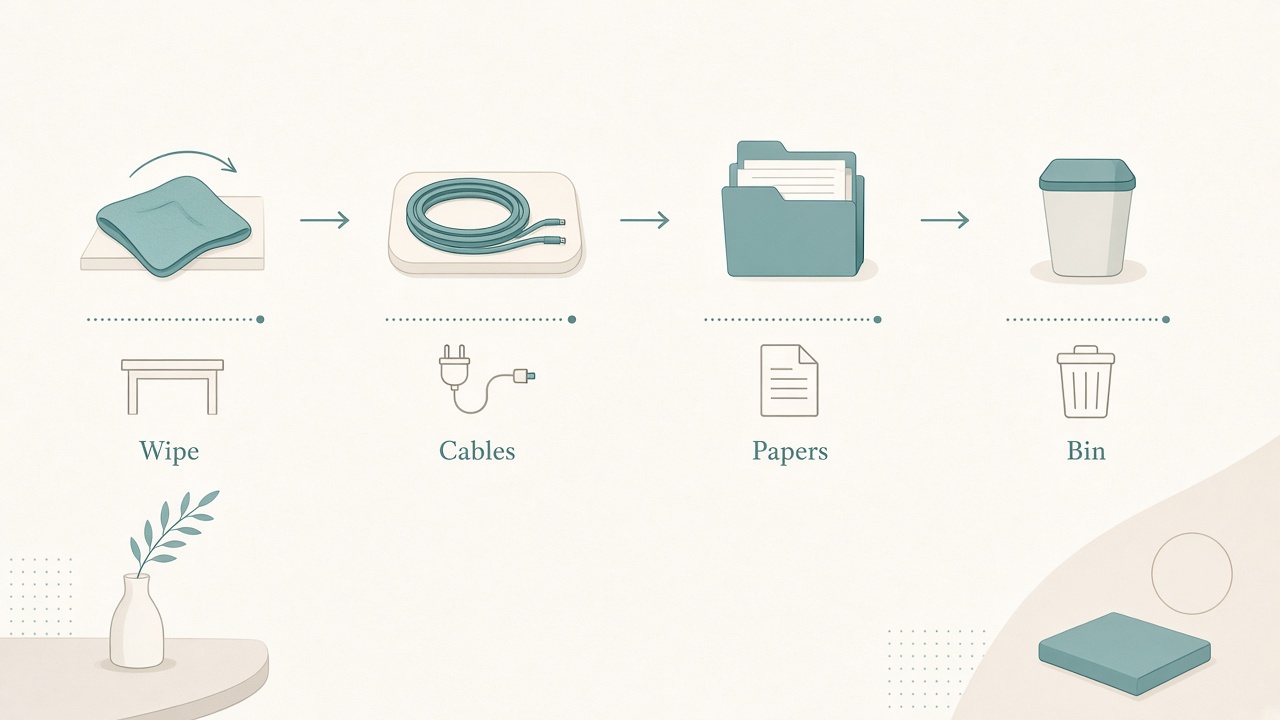
Wipe, coil, sort, and empty in twenty minutes.
Why a weekly reset beats occasional deep cleans
Occasional deep cleans fail because they wait for chaos. By the time the desk feels unbearable, the reset requires an hour you do not have, so it slips another week. A fixed twenty-minute block catches debt while it is still small: one abandoned cable, a few paper scraps, and a short list of open loops.
The reset also protects posture and focus indirectly. A clear keyboard zone makes it easier to keep external input devices centered. A calm cable plant reduces mid-call disconnects. A staged Monday artifact reduces the first twenty minutes of aimless tab opening.
Treat the block as maintenance, not as a mood-dependent chore.
Minutes 0–5: clear the surface
Remove cups, dishes, snack wrappers, and dead paper. Wipe the desk once. Anything that is not a daily tool goes to an inbox tray or leaves the room.
Do not deep-clean baseboards during this block. Surface clarity is the whole job in the first five minutes. If you start scrubbing corners, you will spend the timer on the wrong layer and leave cables untouched.
Keep a small donate or relocate pile beside the desk if objects migrated from another room. Move that pile out of the workspace before the timer ends so the desk does not inherit a new storage project.
Minutes 5–10: cables and power
Trace the cables you actually used this week. Coil slack. Unplug one abandoned brick. Label anything you had to guess. If a standing desk yanked a cable, fix the slack loop now while the failure is fresh.
A calm cable plant is not aesthetics alone. It is fewer mid-call disconnects and fewer awkward lunges when the desk rises. Route power bricks to the back edge so knees do not kick them during sit/stand swaps.
If you use a laptop dock, confirm the one cable you depend on still seats firmly. Travel weeks and bag transfers loosen connectors that look fine until a meeting starts.
Minutes 10–15: digital residue on the desk
Close the physical proxies of digital chaos. Sticky notes that already live in your task app can go. Printed pages you already filed can go. Notebooks opened to the wrong week can be closed or retagged.
Write three leftover open loops on one card or one task list. Throw the rest of the scrap paper out. The goal is a single capture point, not a museum of half-intentions across four pads.
If a sticky note represents a project rather than a next action, convert it into a task with a verb before you discard the paper. Untranslated scraps return as guilt rather than as work.
Minutes 15–20: stage Monday
Put the first-focus artifact where your hands will find it: the notebook, the charger, the headset, or the draft folder shortcut. Set the chair and monitor to your normal geometry so Monday does not start with fidgeting.
If you use a sit/stand desk, park it at sitting height unless you know you start standing. Stage the mat so the chair can roll. Fill the water bottle. Leave one visible cue for the first create block and hide secondary gadgets that invite shallow work.
The last minute is for stopping. When the timer rings, walk away even if a cable still looks imperfect. A finished short reset beats an abandoned ambitious one.
A reset that fails on purpose
If you spend the twenty minutes buying new organizers online, you failed the reset. Shopping is a different project. This block only restores the station you already own.
If you migrate every folder on the computer, you also failed the reset. Digital archaeology expands without limit. Keep digital cleanup inside the same timer and limited to desktop icons or one download folder sweep.
If shared household clutter takes over the block, pause and renegotiate ownership. A workspace reset cannot also be a whole-apartment cleanup without losing its weekly repeatability.
Shared desks and travel exceptions
On a shared desk, split ownership. Each person resets a personal half, then both clear the shared middle for two minutes. Put names on chargers so mystery bricks stop returning.
If you travel, skip a full week without guilt. Run a ten-minute version the night you return before the first deep work block: surface clear, power check, and Monday staging only. That shorter return ritual prevents travel improvisation from becoming your new permanent home setup.
A two-minute daily tidy still helps. The weekly block exists to catch cable and loop debt that daily tidy misses.
Monthly add-on
Once a month, add about ten minutes to the weekly reset. Vacuum under the desk, wash the bottle and mug set, and re-check monitor height after any furniture shifts. Bolt that add-on to the last weekly reset of the month so it does not float away as a separate forgotten chore.
Use the monthly pass to retire one unused object from the desk surface. Minimalism here is practical: every visible object should still have a job.
Making the habit stick
Put the reset on the calendar with the same seriousness as a recurring meeting. Attach it to an existing Friday shutdown or Sunday planning ritual so it does not require fresh motivation.
Keep a printed or saved checklist near the desk. Decision-free minutes are faster minutes. After four weeks, review whether Monday starts with less scavenger time. If it does not, the reset is skipping a layer you actually need, often cables or open-loop capture.
Checklist
- Timer set for 20 minutes
- Surface cleared and wiped
- Cables coiled and one unused brick removed
- Open loops captured in one place
- Monday’s first tools staged
- Chair path and sit/stand parking checked
- Shopping and deep digital migrations deferred
- Stop at the timer
FAQ
What if the desk is shared?
Split ownership of personal halves, then clear the shared middle together for two minutes. Label chargers and docks so each brick has an owner.
Should I reset daily instead?
A two-minute daily tidy helps, but the weekly block catches cable and loop debt that daily tidy misses. Use both if your desk accumulates paper and adapters quickly.
What about digital desktop icons?
If they bother you, add a five-minute digital declutter inside the same timer. Do not open a two-hour folder migration during the reset.
Can I skip a week while traveling?
Yes. Run a ten-minute version the night you return before the first deep work block.
What if twenty minutes is never enough?
You are probably mixing reset with renovation. Keep the weekly block restorative. Schedule a separate one-hour project for storage redesign or cable rewiring.
A twenty-minute weekly reset works when it stays boring and finite. Clear the surface, tame cables, capture open loops, stage Monday, and stop when the timer says stop.