Article
Meeting-heavy day desk survival plan

A meeting-heavy day is a different sport from a deep-work day. Your calendar looks full, so you skip posture resets, lean toward a laptop camera, and wonder why attention fails by late afternoon. Survival is not cynicism. It is a desk plan that assumes back-to-back calls and still protects geometry and a few scraps of focus. This guide is practical and educational, not medical advice. If discomfort persists, seek professional evaluation. Here we focus on setup, transitions, and micro-recovery between sessions.
At a glance
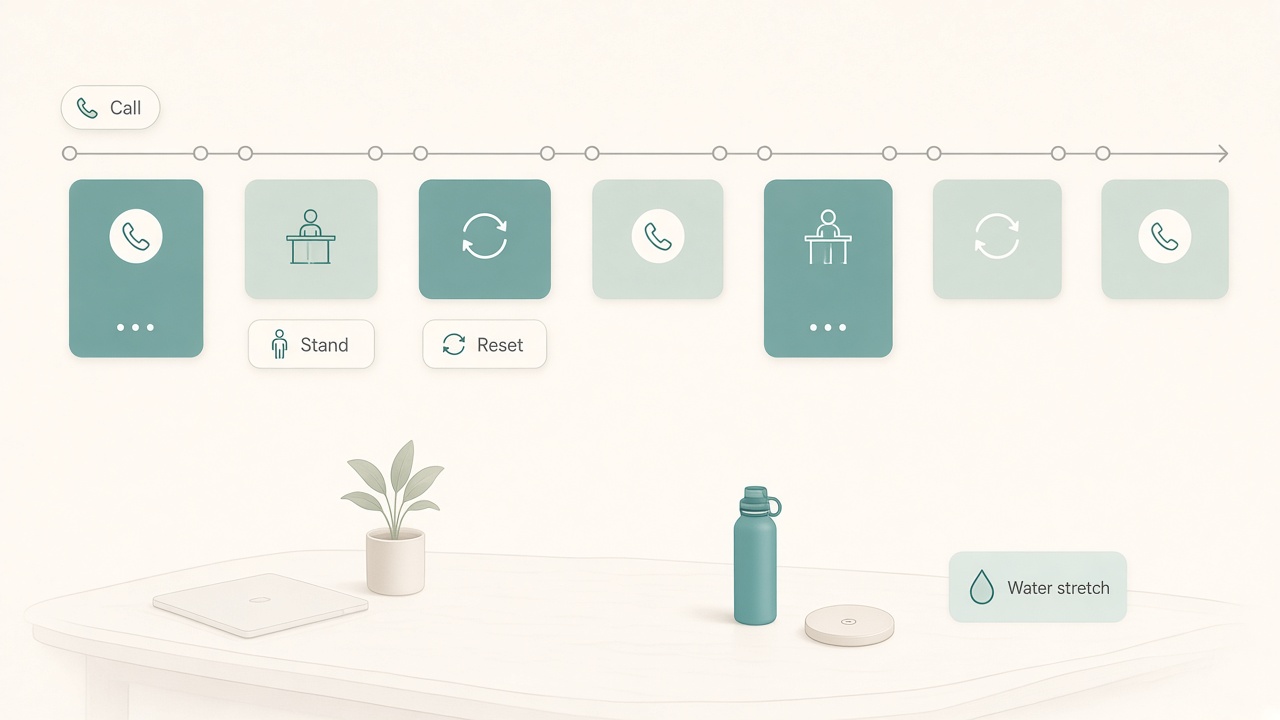
Call blocks with stand and reset gaps between them.
Read the calendar like a physical load
The night before or first thing in the morning, scan for clusters: stacks of consecutive calls, screen-share sessions that increase leaning and mouse travel, emotionally heavy one-to-ones, and gaps of five to ten minutes that can become resets instead of chat spirals.
Mark one pressure block and one recovery gap. Your plan only needs to succeed around those two anchors. Trying to optimize every half hour creates its own stress. If you control scheduling, insert short buffers. If you do not, treat natural gaps as sacred: stand, water, look far away, then join the next call early.
Set the station for faces, not typing marathons
Meeting days punish laptop-flat posture. You crane toward a low camera, shrug toward a weak mic, and lock your hips. Spend five minutes on pre-flight. Raise the camera near eye level with a stable riser or a webcam on the monitor. Keep keyboard and mouse at a height that lets elbows rest near your sides; use an external keyboard if the laptop is elevated, guided by desk height logic. Place water and a notepad in the same reach arc. Check front lighting so you are not a silhouette fighting the window.
You will still type, but the station should assume your primary job today is listening and responding with a stable head position.
Sit/stand swaps that survive real calls
Standing for every meeting sounds virtuous until your feet complain during a long review. Alternate with intention: sit, stand, sit, then walk a gap. Keep stand height conservative so shoulders stay soft while you gesture. Save desk presets for call-sit and call-stand so you are not hunting buttons while the meeting chime plays. A light structure from the standing desk schedule builder can remind you to change without turning posture into a second job.
During stand calls, keep soft knees and shift weight occasionally. Do not lock into a parade-rest pose for forty-five minutes. If you wear shoes that punish standing, keep a supportive pair by the desk for stand blocks rather than forcing the same footwear through every call. Soft mats help some people during longer stand meetings; they are optional support, not a requirement to stand all day.
Screen-share reviews often favor sitting because mouse precision and note capture stay calmer. Conversational one-to-ones often favor standing because energy and breath stay freer. Match the posture to the meeting type instead of forcing one ideology across the whole calendar.
Micro-recovery between back-to-back sessions
Five minutes is enough if you refuse to open the inbox. Leave the meeting window for visual closure. Stand if you were sitting, or walk if you were standing. Look at something several meters away for about twenty seconds. Unclench the jaw once. Sip water. Write one line with decision, owner, and due date from the call you just left. Join the next call one minute early with notes ready.
Skip the “quick chat check” unless you are on-call. That check expands until the next meeting starts with you already behind. If gaps are only two minutes, do a tiny reset—stand, look far, water, join—and capture commitments immediately after the stack ends. The script is intentionally boring. Boring resets are the ones you will still run when the calendar is hostile.
Protect one island and end the day on purpose
Even on brutal days, fight for a 45–90 minute island where the calendar already has a hole. Use one artifact goal, keep the phone face down, and skip optional syncs. If the island is impossible, shrink it to a twenty-minute shutdown block: capture commitments, schedule follow-ups, and close the laptop on purpose. Meeting days create open loops; loops steal evenings.
Technical friction multiplies fatigue. Use headphones that still feel tolerable after hour three, keep a backup wired pair, pin active speaker view if gallery view makes you hypervigilant, and turn off self-view if seeing yourself drains attention. Run do-not-disturb and batch chat at gaps. Keep a paper parking lot for ideas that try to hijack listening so you can stay present without losing the thought.
When the last call ends, list commitments before they vanish, assign dates or owners, clear meeting props, return desk height to your deep-work default, and change context with light, music, or a short walk. That close keeps a high-stimulation shift from contaminating personal time. Meeting days often leave the laptop riser in a compromise position; putting the deep-work layout back before you quit is part of tomorrow’s focus plan, not optional tidying.
Checklist
- Calendar scanned for pressure stacks and recovery gaps
- Camera near eye level; external keyboard if laptop is raised
- Water and notepad inside easy reach
- Sit/stand alternation planned for consecutive calls
- Between-meeting script excludes inbox by default
- One island or shutdown block protected
- Do-not-disturb on; self-view optional off
- End-of-day commitment capture completed
FAQ
Should I stand for all video calls?
Usually no. Alternating reduces static load. Stand for shorter or more conversational calls; sit for long screen-share reviews if that keeps you stable. Comfort and clear speech beat posture ideology.
What if gaps are only two minutes?
Do a tiny reset: stand, look far, water, join. Skip the commitment write until a longer gap, but capture it immediately after the stack ends.
How do I stop meeting posture from affecting deep work the next day?
Reset geometry at shutdown: monitor distance, desk height, and chair height. Meeting days often leave a compromise riser position. Put the deep-work layout back before you quit.
Is it rude to take camera-off breaks?
Norms vary. If culture requires camera on, use posture swaps and better framing instead. Where async is accepted, camera-off processing time can be healthier than a theater of exhausted nods.
Can I stretch on camera?
Subtle mobility is fine; elaborate routines are distracting. Save bigger resets for gaps. Soft shoulder drops and weight shifts rarely bother anyone if you stay engaged verbally.
Related tools: standing desk schedule · desk height