Article
Keyboard tilt and wrist extension

Upward wrist bend while typing is often a desk-height problem wearing a keyboard costume. Built-in kickstands, thick wrist rests, and “ergonomic” defaults can increase that bend when the board already sits too high. This guide explains how to set tilt after chair and desk height are roughly right, when a rest helps between bursts, and how to run a two-minute visual check. It is educational setup guidance, not medical advice.
At a glance
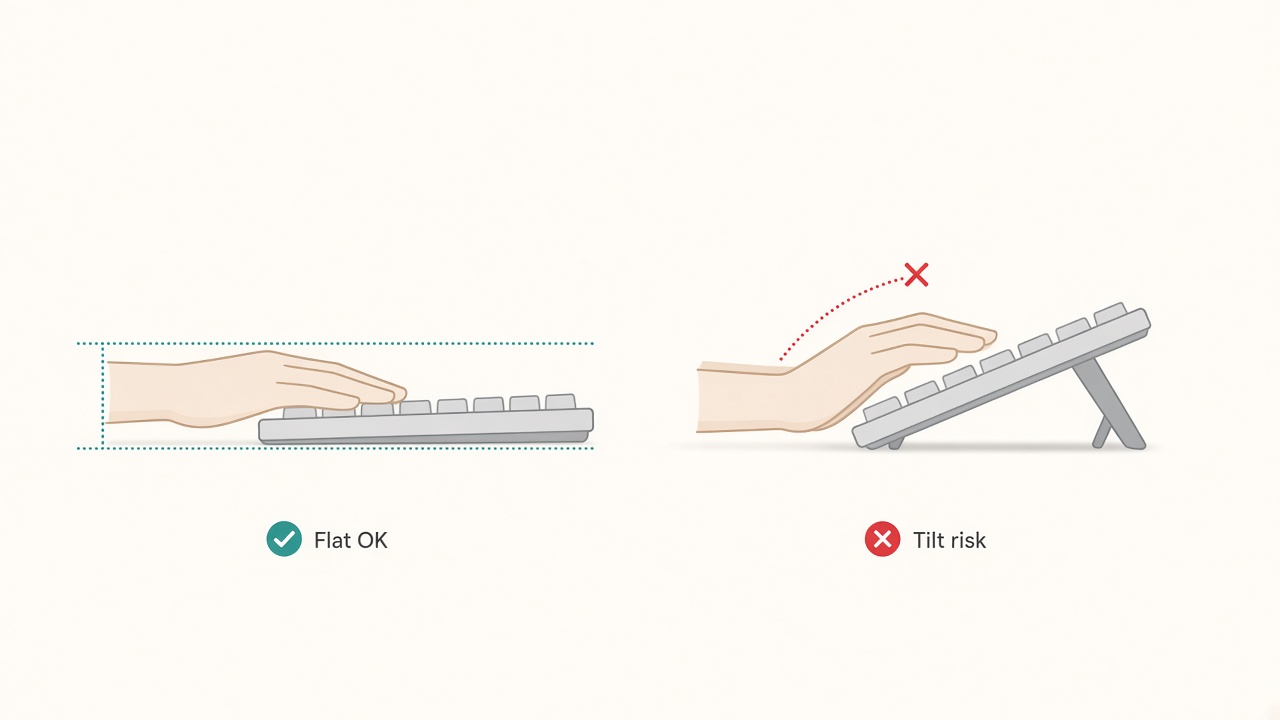
Prefer a flatter board to reduce wrist extension.
Start with height, then touch tilt
Tilt cannot rescue a keyboard that sits above a workable elbow line. Set the chair and desk first so forearms stay roughly parallel to the floor while you type. The desk height calculator gives a starting target; refine it after a real writing or coding block.
Only after that baseline should you adjust kickstands, tray angle, or palm rests. If the board is already high, adding a fat gel pad parks the wrists higher still and can increase extension into the keys. People then blame the keyboard brand when the stack order was wrong.
A useful sequence is stable: seat height that plants the feet (or uses a proper footrest), desk or tray height that meets the elbows, keyboard tilt that avoids a ramp into the keys, and only then optional resting support for pauses.
What wrist extension looks like at a desk
Extension here means the hand bends upward at the wrist so the knuckles sit higher than the forearm line while you strike keys. A mild angle appears in many setups. A sharp ramp—especially held for hours—usually traces back to positive tilt, a thick front edge, a high desk, or a rest that lifts the palms during active typing.
Contrast matters for troubleshooting. If shoulders shrug, suspect desk height. If shoulders look calm but wrists still ramp upward, suspect tilt, board thickness, or a rest used as a typing platform. If only one wrist looks bent, check mouse height and reach on that side; mismatched pointer height recreates the same pattern.
Keep language precise during adjustments. “My wrists hurt” is a prompt to inspect geometry, not a diagnosis. Change one variable at a time so you know what helped.
Tilt guidelines that work for most boards
Many typists do better with flat tilt or a slight negative tilt, where the front edge sits a little higher than the back. Negative tilt is common on adjustable trays. On a fixed desk, folding rear kickstands down is often the quickest improvement.
Built-in rear legs that raise the back of the board increase extension for a large share of users. Those legs exist partly for viewing angle on steep desks and for older “typewriter” habits. Try them folded for a full workday before you decide you need them. If you write on a laptop keyboard, the deck’s inherent wedge already adds positive tilt; an external flat board usually helps more than another accessory under the laptop.
Match mouse height to the key tops, not to a thicker side stack of notebooks. A pointer that sits higher than the keyboard recreates extension on the mousing side even when the board itself is flat.
Compact boards can help because the mouse sits closer, but they do not automatically fix tilt. Apply the same flat-or-negative rule after you place the compact board in the elbow zone.
Wrist rests: pauses only, not a typing platform
A rest can cushion the palms between bursts of typing. Planting the heels of the hands hard on gel while actively striking keys can encourage a static posture and a higher wrist line. Use a light touch, keep the hands free to move, and park on the rest when you stop to read or think.
Thickness matters. A tall rest under an already thick keyboard raises the palm contact point and can steepen extension into the keys. If you use a rest, choose a height that meets the front edge of the board rather than towering above it. Firm foam or a contoured palm support often stays more predictable than a soft gel brick that collapses unevenly.
Skip the rest entirely if your tray already supports a gentle negative tilt and your forearms feel supported by chair armrests set just below elbow height. Armrests that are too high shrug the shoulders; armrests that are too low do not replace a palm rest during pauses. Adjust those before buying another pad.
Laptop and dual-board special cases
Laptop keyboards combine a low screen with a wedged typing deck. Separating jobs fixes more than tilt tricks: raise the display on a riser, type on an external flat keyboard, and keep the pointer beside that keyboard. Trying to “fix” the laptop’s built-in wedge with a taller wrist rest usually worsens extension.
If you alternate between a mechanical board and a laptop on travel days, accept that tilt settings will differ. Pack a flat travel keyboard when you can. When you cannot, reduce positive tilt wherever the site allows—fold stands, avoid stacking the laptop on soft pillows, and take shorter typing bursts with deliberate pauses.
Tenkeyless and ortho boards change reach and shoulder travel more than they magically neutralize wrists. Still set height first, then tilt. Specialty geometry is an advanced layer, not a substitute for the baseline stack.
Two-minute test and a one-week tune
Type normally for two minutes, then glance sideways at your wrists without changing posture. If they look like a ramp up into the keys, lower the keyboard, remove positive tilt, drop the desk or tray pairing, or thin out the rest—do not raise the back legs further.
Repeat the glance after lunch and near the end of a long block. Fatigue often recreates shrug and extension even when the morning setup was fine. A sticky note on the monitor for one week—“flat tilt, light palms”—beats a complex checklist you will ignore.
Change one factor per day when you are unsure. Day one: kickstands down. Day two: rest only between bursts. Day three: desk or tray height. Day four: mouse height match. This isolation prevents random accessory churn.
Common mistakes that recreate extension
Raising rear kickstands because a review photo looked aggressive is a frequent miss. Copying a friend’s steep tenting without matching desk height is another. Using a wrist rest as a permanent palm shelf while hammering keys combines both errors.
Ignoring chair height while micro-adjusting tilt wastes time. So does placing a thick Bible of notebooks under the monitor stand such that the keyboard must sit farther forward; reach then masquerades as a tilt problem. Bring the board close to the body at elbow height, then judge tilt again.
Finally, do not treat numbness, persistent pain, or acute injury signs as a DIY tilt puzzle. This article covers setup hygiene only. Seek qualified professional evaluation for ongoing symptoms.
Checklist
- Chair and desk height set so forearms are roughly parallel while typing
- Rear kickstands tried in the folded/flat position for a full day
- Negative or flat tilt preferred over steep positive tilt
- Mouse height matched to key tops
- Wrist rest used for pauses, not as a hard typing platform
- Rest height aligned with the board’s front edge, not towering above it
- Laptop typing separated from screen height via external keyboard when possible
- Two-minute sideways wrist check completed after changes
- One variable changed at a time during the tune-up week
FAQ
Should I always use negative tilt?
No. Flat often works well. Slight negative tilt helps many tray users. Steep negative angles are unnecessary for most desks. Choose the smallest change that removes a visible upward ramp.
Are gel wrist rests bad?
They are not inherently bad. They become unhelpful when they lift palms during active typing or compress unevenly. Prefer pause-only use and a height that meets the board’s front edge.
Why do my wrists still bend upward after I fold the kickstands?
Desk or keyboard height is probably still too high, or a thick rest is lifting your palms. Recheck elbows with the desk height logic, then reassess rest thickness.
Do tented or split keyboards solve extension automatically?
They change wrist deviation and shoulder angles for some people, but they do not replace height setup. Set desk and tilt basics first; treat specialty boards as a later experiment with a real learning curve.
Can chair armrests replace a wrist rest?
Sometimes for pauses, if armrests sit just below elbow height and do not shrug the shoulders. They should not force you to reach forward to the keys. Adjust armrests and board distance together.
Related tools: desk height