Article
Document naming rules for a home office

Your home office can look tidy while your Downloads folder remains a landfill of final drafts with conflicting suffixes. Document naming is unglamorous infrastructure. Done well, it saves more time than another productivity app and keeps collaboration with clients or family from turning into archaeological digs.
This system is intentionally lightweight. If a rule needs a wiki to explain, you will abandon it.
At a glance
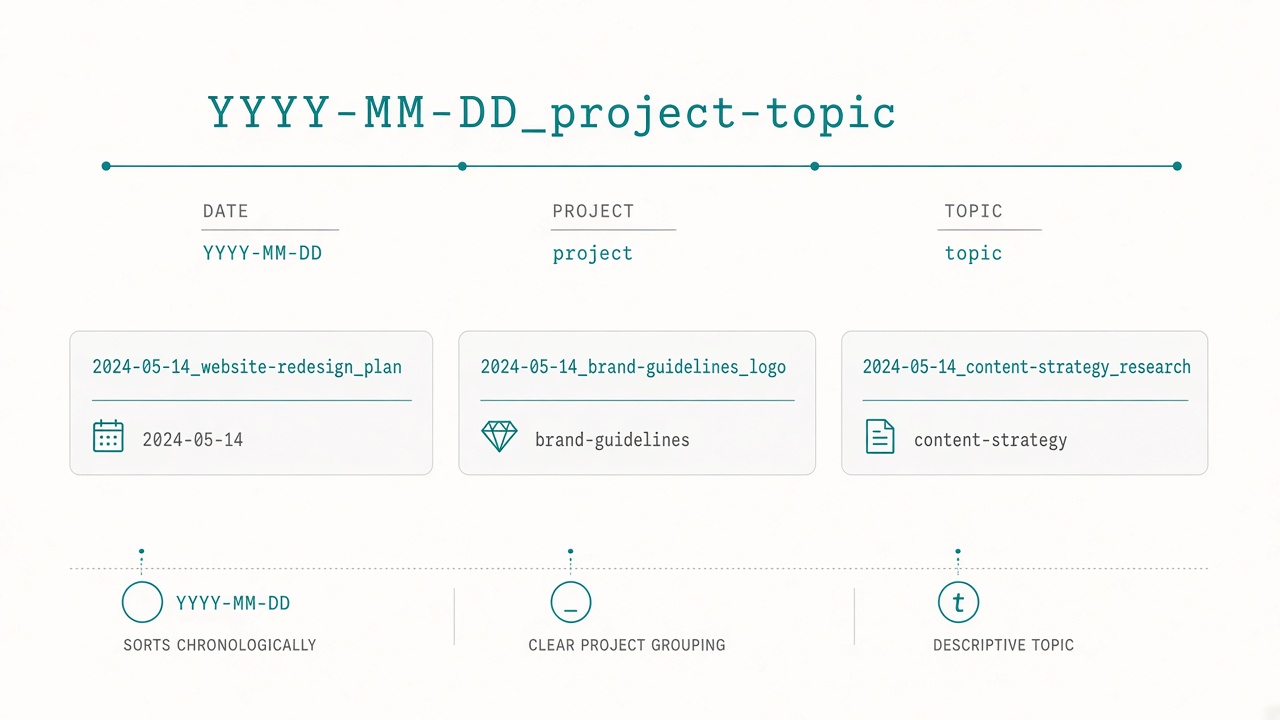
Date-first names that sort and search cleanly.
Goals for a home-office naming system
A useful naming system is sortable in any file manager without special software. It is readable out loud on a call. It is collision-resistant when two files share a topic. It is boring enough that you will apply it when tired.
Pretty folders cannot compensate for chaotic filenames.
The core pattern
Use YYYY-MM-DD_topic_slug_version.ext. An example is 2026-11-09_q4-hiring-plan_draft.docx.
Date-first keeps chronological sorts sane. The topic slug is skimmable. A controlled version word avoids endless “final” variants. For files that should sort by project instead of date, lead with a project code such as ACME_2026-11-09_invoice_0127.pdf.
Pick one lead style per domain—work versus personal—and stick to it.
Rules that prevent most pain
Use lowercase slugs with hyphens. Consistency matters more than which separator you prefer; if you already live in underscores, stay there. Spaces break command-line habits and some sync tools.
Use ISO dates such as 2026-11-09, which sort correctly across regions. If you only know the month, use 2026-11_topic.
Limit version words to a controlled vocabulary: notes, draft, review, final, signed, archived. When a final changes, save final-r2 or bump the date and archive the previous final in an /_old folder.
Avoid mystery initials. If you must abbreviate, keep a one-line legend in the project root. Prefer clarity for anything you touch monthly or less.
Treat Downloads as a hallway, not a bedroom. Anything that stays more than 48 hours gets renamed and moved. A weekly ten-minute sweep beats quarterly shame.
Folder depth: shallow by default
Home offices drown in nested trees. Prefer shallow paths such as /work/client-name/2026-q4/, /personal/taxes/2025/, and /ops/receipts/2026-11/.
Let the filename carry specificity so folders stay few. Deep hierarchies feel organized until you forget which branch you used.
Templates for common home-office files
Meeting notes can follow YYYY-MM-DD_meeting_slug_notes.md. Invoices can follow CLIENT_YYYY-MM-DD_invoice_####.pdf. Proposals can follow YYYY-MM-DD_client_proposal_draft.docx. Screenshots can follow YYYY-MM-DD_slug_ui.png. Exports can follow YYYY-MM-DD_system_export_slug.csv.
Copy the patterns into your notes app. Decision fatigue is what sends people back to generic default names.
Collaboration without chaos
When others send poorly named files, rename your stored copy immediately. Keep the original mail attachment if legal or audit needs require it. For shared drives, agree on the pattern in one paragraph at project kickoff.
Version conflicts in cloud sync often come from two people editing the same vaguely named file locally. Use review initials or a proper shared-document platform for simultaneous editing. Filenames alone cannot solve live collaboration.
Migration without a heroic weekend
Do not rename your entire life archive. Apply the system forward on all new files. Rename anything you open at the moment you open it. Clean one active project end-to-end as a model.
Perfect historical purity is a trap. Momentum beats museums.
Search habits that make the system pay off
Naming is only half of retrieval. In OS search, type the date prefix or client code first. In email, match attachment names to stored copies so you can search either side. In cloud drives, avoid duplicate uploads with slightly different names; replace or version explicitly.
When you cannot find a file in thirty seconds, note whether the failure was naming, folder depth, or sync lag. Most “I need a new app” moments are inconsistent names.
Screenshots, exports, and noisy outputs
Modern work spews auto-named junk. Build a reflex: rename immediately before the file leaves Downloads, or empty a daily noise-inbox folder at shutdown with bulk renames. For screenshots that support a ticket or document, include the ticket slug so future searches during regression week succeed.
Household, multi-device, and end-of-day habits
Phones, tablets, and a partner’s laptop invent new naming dialects. Keep a shared incoming folder for household paperwork with the ISO pattern enforced weekly by whoever files. Light bureaucracy wins when a claim depends on five photos with camera-default names.
For non-code files such as decks and contracts, prefer dated copies over floating version numbers. When a true milestone ships, move prior review copies into /_old rather than deleting immediately. Put the live editable file in a stable path.
Before shutdown, open Downloads, rename or delete today’s leftovers, move renamed files to their project folders, and empty the trash if you deleted duplicates on purpose. This sweep pairs cleanly with a desk reset because digital clutter and physical clutter grow from the same “later” habit.
What success looks like after one month
After four weeks of forward-only naming, you should be able to find last week’s invoice, proposal, or meeting note in under thirty seconds without opening five folders. Search should start from a date or client code rather than from memory of a clever title. Shared projects should stop accumulating parallel copies with slightly different spellings of “final.”
If retrieval still fails, diagnose the break. Inconsistent separators usually mean you never chose one lead style. Deep folder trees usually mean the filename is still too vague. Sync duplicates usually mean two devices saved the same work under different names. Fix the failure mode you actually have instead of adding another app layer.
Checklist
- One written pattern for work files, one for personal if needed
- ISO dates and a tiny allowed version vocabulary
- Project root legend for any abbreviations
- Downloads sweep scheduled weekly
- Shallow folder set created; deep nests avoided
- Kickoff note ready to paste into shared projects
- Habit: rename on first save, not later
FAQ
Should every filename include my name?
Only on shared handoffs where attribution matters. Inside your private drive it adds noise.
What about photos from phones?
Phone defaults are ugly but dated. Either leave camera rolls alone or batch-rename only the ones that enter work workflows.
Is this better than a note database or second-brain app?
They solve different layers. Apps help thinking and links; filenames help every PDF, export, and OS search. Use both if you will maintain them; skip either if you will not.
How do I handle recurring monthly files?
Use YYYY-MM_topic without a day, or always the first-of-month date. Example: 2026-11_rent-receipt.pdf.
What if legal docs require original names?
Store a pristine /_source copy and a renamed working copy, or keep a text sidecar mapping original to new name. Do not violate retention rules for aesthetics.