Article
Budget ergonomic checklist under free-to-cheap upgrades

You do not need a flagship chair on day one. You need a stable sequence: posture geometry first, comfort accessories second, and furniture replacement last. This checklist orders free adjustments and low-cost upgrades so money follows diagnosis instead of marketing. The guidance is educational setup advice for desk work, not medical treatment for pain or injury.
Many budget setups fail because purchases arrive in the wrong order. A premium chair cannot fix a keyboard that sits too high. A motorized desk cannot fix a monitor that forces a constant downward stare. Treat geometry as the foundation, then spend only where a clear gap remains.
At a glance
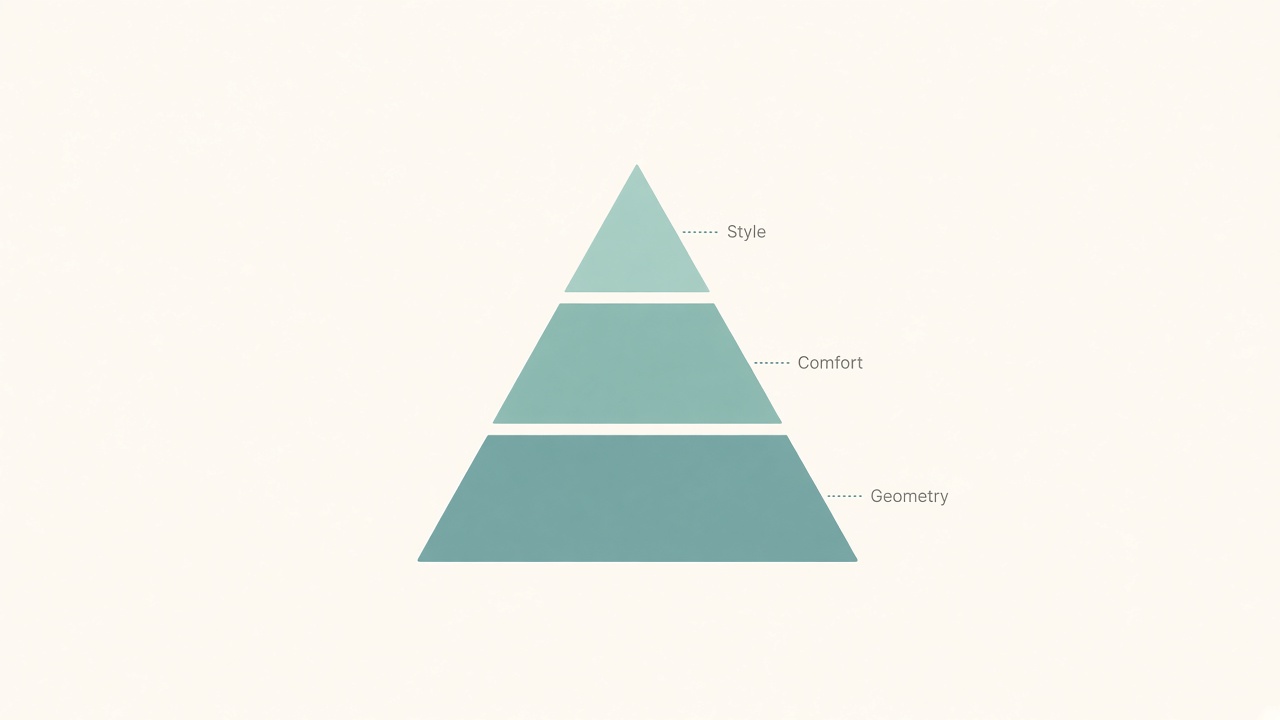
Fix geometry before comfort accessories and style.
The priority rule behind every item
Change one variable at a time and keep terminology consistent: seat height, elbow height, screen height, and reach distance. When two variables change together, you cannot tell which fix helped. Free tools on this site help you set those baselines before shopping—especially the desk height, monitor distance, and standing desk schedule tools.
A useful audit question is simple. After twenty minutes of normal work, where does tension appear first: neck, shoulders, wrists, lower back, or feet? That answer points to the axis you should adjust next. If shoulders improve but wrists worsen, you likely changed the wrong axis. Reset and try again.
Free adjustments to complete first
Set chair height so feet are supported on the floor or a firm footrest. Dangling feet create pressure at the front of the seat and invite restless perching. Next, align the desk or keyboard surface near elbow height so forearms can stay roughly level while typing. If the desk is fixed and too high, lower the chair only if feet remain supported; otherwise add a footrest rather than typing with shrugged shoulders.
Raise the monitor with books or a riser box until the top third of the screen sits near eye level while you sit tall. Laptop screens on the desk surface almost always fail this test unless you add an external keyboard and mouse. Move the mouse closer so the elbow stays beside the body instead of reaching across the desk. Finally, add a sit/stand or movement reminder cadence so static posture does not become the all-day default.
These free steps catch problems that no cushion, mat, or luxury chair can fully erase. Complete them before any purchase larger than a notebook and pen for notes.
Cheap upgrades that usually help after geometry is honest
An external keyboard and mouse help laptop users who need screen height without typing on a raised deck. A footrest helps when a fixed desk forces a higher seat than your legs prefer. An anti-fatigue mat can soften short stand blocks on hard floors after you already use a sane standing schedule. A clip-on monitor light or simple task lamp improves evening readability without forcing the screen to act as the room’s only light source.
A basic laptop riser replaces precarious book stacks once you know the height that works. A small desk mat can define mouse territory and reduce shoulder reach on wide tables. Cable clips that keep the mouse cord from tugging are trivial until you notice how often a snag pulls your hand outward. Each of these items is cheap relative to furniture and should map to a named problem from your audit.
Skip novelty accessories that do not change height, reach, light, or schedule. If an item cannot be tied to a specific failure mode, it is decoration.
Purchases to delay until basics are stable
Premium chairs, motorized desks, and monitor arms are excellent tools when they amplify a good setup. Bought early, they often amplify a mismatch at higher cost. A monitor arm on a desk that is already too high still leaves the keyboard relationship wrong. A high-end chair behind a laptop-only layout still leaves the neck flexed toward a low screen.
Wait on these until seat height, elbow height, screen height, and pointing device reach feel workable for a full work block. Then buy the piece that removes the largest remaining constraint. If the chair mechanism is broken, replacement can jump the queue earlier—but even then, measure desk height and monitor needs so the new chair is not chosen on comfort marketing alone.
A one-hour audit you can repeat monthly
Work normally for twenty minutes without correcting posture on purpose. Note the first tension point and the clock time it appears. Adjust one variable—seat height, keyboard position, monitor height, or mouse placement—then work another twenty minutes. Record whether the original tension eased and whether a new complaint appeared.
Use the final twenty minutes to test a short stand or walk break if afternoons feel static. The goal is not a perfect score. The goal is a short list of mismatches ranked by severity. That list becomes your shopping queue for the next budget cycle.
Repeat the audit after any room change, new laptop, or new desk. Geometry drifts when furniture moves even a small amount.
A sample spending ladder for one quarter
Month one spends almost nothing: free height fixes, a footrest if required, and an external keyboard/mouse for laptop users. Month two adds light and standing comfort only if evenings or short stands still feel harsh. Month three considers a used adjustable chair or a simple monitor arm only if the audit still names those gaps.
This ladder prevents the common pattern of buying a full “ergonomic bundle” in one weekend and still typing with shrugged shoulders. It also leaves room to stop spending once the workstation feels honest enough for your actual hours.
Mistakes that waste a small budget
Buying a thick seat cushion to compensate for a desk that is too high often raises the body into a worse shrug. Standing all day on a new mat to escape a bad chair trades one load for another. Mounting a monitor arm before the laptop has an external keyboard leaves the critical typing surface unchanged. Chasing brand names before measuring elbow and eye lines turns research into delay.
Another frequent miss is ignoring reach. A beautiful keyboard placed too far away still loads the shoulders. Pull primary input devices into a close arc, then evaluate comfort again before opening a shopping tab.
Checklist
- Feet supported at the working seat height
- Keyboard near elbow height without shrugged shoulders
- Monitor raised so the top third is near eye level
- Mouse within a close reach arc beside the keyboard
- Laptop users have external keyboard and mouse before raising the screen
- Free measurement tools used before furniture shopping
- Sit/stand or movement cadence defined for the afternoon
- Cheap upgrades mapped to a named failure mode
- Premium chair/desk/arm delayed until geometry is stable
- One-hour audit notes saved for the next budget decision
FAQ
What is the first upgrade most laptop workers should buy?
An external keyboard and mouse, paired with any stable riser, usually changes geometry more than a new chair. Screen height and typing height need to be separate surfaces.
Can a budget chair be “good enough”?
Yes, if it offers stable seat height, a backrest you can use, and enough adjustment to match your desk. Fancy materials matter less than honest height and support for your work blocks.
Do I need a standing desk on a tight budget?
Not necessarily. A reminder cadence, short standing intervals at a counter, and better seated geometry often help first. A converter or full standing desk can wait until the schedule habit exists.
How do I know a cushion is the wrong next buy?
If your shoulders shrug, feet dangle, or wrists extend after adding thickness, the cushion is hiding a height mismatch. Fix desk and seat relationship before adding foam.
When is a premium purchase justified?
When free and cheap steps are done and one constraint still dominates the day—such as a failed chair mechanism or a monitor that cannot reach height without an arm. Buy the constraint remover, not a full aesthetic refresh.
Related tools: desk height · monitor distance · standing desk schedule